Typing With Long Nails: Why It Feels Harder and What Can Help
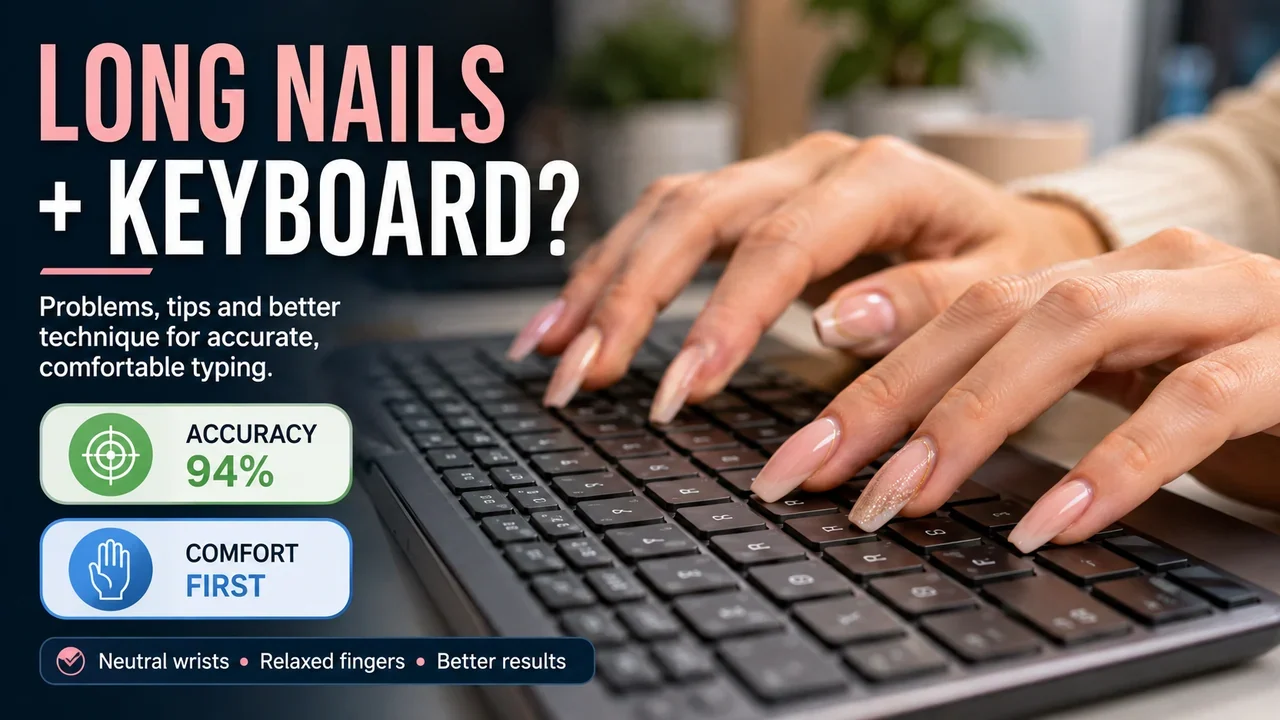
Long nails and keyboards are not always an easy combination.
You may be perfectly comfortable typing with short nails, then notice an immediate change after getting longer acrylic, gel or natural nails.
Keys that normally feel automatic become easier to miss. Fingernails hit the keyboard before the fingertips do. You may start holding your hands differently without even noticing.
So can you still touch type with long nails?
Usually, yes.
But the longer the nails become, the more likely you are to change the finger position that normal touch typing relies on.
Why do long nails make typing harder?
Normal keyboard technique uses relaxed hands and gently curved fingers.
Chelsea and Westminster Hospital's hand-therapy guidance recommends keeping the wrists straight and the fingers gently curved when working at a keyboard.
Source: Chelsea and Westminster Hospital – Desk health ergonomics
Long nails can interfere with that position.
When the nail extends significantly beyond the fingertip, it may touch the key or keyboard surface before the pad of the finger reaches its normal position.
You then have to adapt.
That might mean:
- flattening the fingers;
- changing the angle of the hand;
- pressing keys with more of the finger pad;
- reaching differently for upper and lower rows;
- slowing down to avoid catching a nail;
- pressing neighbouring keys accidentally.
A small change in nail length might barely matter.
A much longer nail can noticeably change the mechanics of every keystroke.
Can you touch type properly with long nails?
It depends partly on what you mean by long.
Slightly extended nails may require almost no adjustment.
Very long nails can make traditional curved-finger touch typing difficult because the nail reaches the keyboard before the fingertip does.
You may still type quickly, but your technique could look different from standard touch typing.
This is not automatically wrong.
The important question is whether the adapted technique is comfortable, accurate and sustainable for the amount of typing you do.
Someone writing a few messages each day has very different requirements from someone spending eight hours answering emails, writing reports or entering data.
How long is too long for typing?
There is no universal maximum nail length for keyboard use.
Hands differ. Nail shapes differ. Keyboards differ too.
A more useful test is to put your fingers naturally over the home row.
Try placing them over:
A S D F
and
J K L ;
without deliberately changing your normal hand position.
Now ask:
Do the pads of my fingers reach the keys comfortably?
Are the nails hitting first?
Do I have to straighten or flatten my fingers to avoid the nails?
Am I changing my wrist position to compensate?
If the nails force you to substantially change the way your hands sit over the keyboard, their length is affecting your typing technique.
That does not mean you must immediately cut them short.
It means you should pay attention to how you are compensating.
Use the pads of your fingers rather than the nails
One common adjustment is to use more of the finger pad.
Instead of pressing almost vertically with the fingertip, the fingers become slightly flatter so that the fleshy part of the finger reaches the key while the nail stays above it.
This can work reasonably well with moderately long nails.
The problem comes when you flatten the hands so much that your wrist position changes too.
OSHA's computer workstation guidance recommends keeping the wrists in a straight, neutral position rather than bending them noticeably upwards or downwards.
Source: OSHA – Computer Workstations: Keyboards
So the aim is not:
protect the nails at any cost
It is:
find a finger position that lets you press the keys without forcing the rest of the hand into an awkward position.
If that is impossible with your current nail length, shortening the nails may be more practical than completely rebuilding your typing technique around them.
Do not lift your wrists to make room for the nails
This is an easy habit to develop.
The nails feel too long, so you raise the hands and approach the keyboard from a different angle.
That may solve the nail problem while creating another one.
OSHA recommends arranging the keyboard and workstation so the wrists can remain in a neutral position. Chelsea and Westminster Hospital similarly advises keeping the wrist straight, with the hands floating over the keyboard while typing.
Sources:
OSHA – Computer Workstations: Keyboards
Chelsea and Westminster Hospital – Desk health typing tips
If you notice your wrists bending backwards because of your nails, stop and reset your position.
Your nails should adapt to the workstation more than your wrists adapt to the nails.
Long nails can affect accuracy before they affect speed
You might still be able to type quickly with long nails.
The first noticeable change may instead be accuracy.
Typical problems include:
- clipping the key above the one you wanted;
- pressing two keys together;
- missing a key because the nail lands first;
- hesitating on keys that require a longer reach;
- accidentally touching neighbouring keys;
- losing your normal rhythm.
This is why a speed-only test can be misleading.
Suppose you normally type:
52 WPM at 97% accuracy
and after changing your nails you manage:
50 WPM at 88% accuracy
Your speed has hardly changed.
Your typing performance has.
If this happens, slow down temporarily rather than trying to force your old WPM immediately.
The same principle applies whenever your technique changes.
Our guide Typing Accuracy vs Typing Speed: Which Matters First? explains why restoring clean typing should normally come before chasing speed.
Give yourself time after changing nail length
If you normally keep short nails and suddenly add long extensions, the keyboard can feel completely different.
Do not judge your typing from the first ten minutes.
Your fingers need time to learn the new contact angle.
Start with something easy.
Type familiar words and short sentences slowly. Work out which keys now feel awkward.
Then increase your pace gradually.
The Qtype Pro weak-key checker can be useful here because the keys affected by the change may not be evenly distributed.
You may discover that letters on one row are causing most of the trouble.
Does nail shape make a difference?
It can.
Length is not the only thing changing how the nail interacts with the keyboard.
A narrow or pointed tip occupies a different space from a broad square or coffin-shaped nail.
The keyboard matters as well.
Large gaps between keys, keycap shape and key travel can all change how much room the nail has when the finger moves downward.
There is no single keyboard design that is automatically best for every person with long nails.
If you type heavily for work, it is worth trying a keyboard before buying one where possible.
Do not judge it only by how it looks.
Put your hands in your normal typing position and type several sentences.
If you immediately find yourself changing your wrist angle or repeatedly catching the nails between keys, that keyboard and nail combination may not suit you.
Would a low-profile keyboard help?
Possibly.
A keyboard with relatively shallow keys can reduce how far the finger has to travel downward.
Some people with longer nails find that easier than typing on tall keycaps with deep travel.
Others prefer more spacing between keys.
Treat this as a personal fit question rather than a rule.
The best keyboard is the one that allows you to maintain a comfortable hand and wrist position while typing accurately.
OSHA's broader ergonomic guidance follows the same principle: the workstation should be adjusted to fit the person rather than forcing the person into an uncomfortable position.
Source: OSHA – Ergonomics
What about acrylic and gel nails?
From a typing point of view, the main issue is usually the length and shape rather than whether the nail is natural, acrylic or gel.
Artificial extensions can create a more sudden change because someone can go from short nails to considerably longer nails in a single appointment.
Your typing habits have had no time to adjust.
Be especially careful if you feel a nail catching between keys.
Do not pull the finger away sharply just to continue typing quickly.
Slow down and change the angle.
If the nails repeatedly catch on your particular keyboard, changing either the keyboard or the nail length is more sensible than repeatedly forcing the movement.
Should you shorten your nails if you type all day?
Sometimes that is the simplest solution.
There is no reason to say that everyone who types professionally must have short nails.
Plenty of people adapt successfully.
But there is also no prize for struggling with a keyboard because you feel you ought to be able to type with a particular nail length.
If you spend several hours a day typing and notice:
- repeated errors;
- awkward wrist positions;
- uncomfortable finger angles;
- constant nail contact with the keyboard;
- difficulty reaching keys;
- substantially reduced typing speed;
try slightly shorter nails next time.
You do not necessarily need to go from very long nails to completely short nails.
A moderate reduction may be enough to let the fingertip contact the keyboard more naturally.
Pay attention to discomfort
Typing should not hurt.
Repetitive strain injury, or RSI, is a general term used for pain caused by repeated movement. The NHS lists repetitive activities and poor posture among factors that can contribute to RSI.
Source: NHS – Repetitive strain injury
Long nails do not automatically cause RSI.
But if your nail length makes you adopt an uncomfortable keyboard position for hours at a time, do not ignore persistent pain simply because you have found a way to keep typing.
Change the setup.
Take breaks.
Review your keyboard and hand position.
If pain persists or worries you, seek appropriate medical advice rather than trying to type through it.
How to practise typing with long nails
If you want to keep your nails and improve your typing, begin by establishing a comfortable technique.
Try this:
- Sit in your normal typing position.
- Keep the wrists as neutral as possible.
- Rest the fingers gently around the home row.
- Find an angle where the finger pads can press the keys without the nails catching.
- Type slowly for several minutes.
- Watch accuracy rather than WPM.
- Note which keys cause repeated problems.
- Increase speed only when the movement feels predictable.
Then take a short typing test.
Record both your WPM and accuracy.
You can use the free Qtype Pro 1-minute typing test for a quick baseline.
If your nail length changes regularly, it can be interesting to compare the results.
For example:
| Nail length | WPM | Accuracy |
|---|---|---|
| Short | 51 | 98% |
| Medium | 49 | 97% |
| Long | 44 | 91% |
Your own results are more useful than somebody else's claim that a certain nail length is easy or impossible to type with.
Frequently asked questions
Can you touch type with acrylic nails?
Yes, many people can.
How much adjustment is necessary depends mainly on the length and shape of the nails and the keyboard you use.
Very long extensions may make traditional curved-finger typing more difficult.
Do long nails make you type slower?
They can, particularly immediately after the nail length changes.
Long nails may also affect accuracy even when WPM remains similar.
Give yourself time to adjust and compare both speed and accuracy.
Is typing with your nails bad?
Try not to use the nail itself as the main contact point.
Typing is normally more controlled when the finger or finger pad presses the key.
Repeatedly striking the nails against the keyboard can also feel uncomfortable and makes key contact less predictable.
What keyboard is best for long nails?
There is no single best keyboard for everyone.
Some people prefer lower-profile keys, while others value more space around the keycaps.
Choose a keyboard that allows you to type without forcing your fingers or wrists into an awkward position.
Should I cut my nails to type faster?
Not necessarily.
Try adapting your finger position first and allow some time to adjust.
If very long nails continue to reduce accuracy, catch between keys or force an uncomfortable hand position, shortening them slightly may be the most practical solution.
Keep the nails if the technique still works
Having long nails does not mean giving up touch typing.
But it may require compromise.
The key question is not whether someone else can type quickly with the same nail length.
It is whether you can type accurately and comfortably without forcing your hands into an awkward position.
Use the finger pads where possible. Keep the wrists neutral. Slow down after changing nail length and give yourself time to adjust.
If the nails continue to get in the way, shortening them slightly is a perfectly reasonable solution.
Your keyboard technique has to work for the hands you actually bring to the keyboard.
Use the Qtype Pro 1-minute typing test to compare your WPM and accuracy, then use weak-key practice if a few particular keys are causing most of your mistakes.